
To check a FEWA bill, open the Etihad WE website, go to Services, choose View & Pay and enter your account number. The amount due appears without a login, and you can pay on the same screen.
FEWA is now Etihad Water & Electricity (Etihad WE), and the old name still gets typed into search boxes every month. The steps below cover the bills Etihad WE issues in Ajman, Umm Al Quwain, Ras Al Khaimah, Fujairah, Al Dhaid and Dibba.
Ways to check & pay bill online
| Method | Available | What you need | Notes |
|---|---|---|---|
| Website, View & Pay | 24 hours | Account number, valid email, credit card | No login; card payments only |
| Website portal | 24 hours | UAE PASS login | Pay each account from the dashboard with a saved card |
| Etihad WE app | 24 hours | UAE PASS login, or the payment option that skips login | PDF downloads, consumption graphs, UAEPay |
| Online banking | 24 hours | Account with one of 12 listed banks | Pay from your bank’s bill payment menu |
| Self-service kiosk | 24 hours | Account number | Pay at the machine |
| Al Ansari Exchange | Saturday to Thursday | Account number | In-branch counter payment |
| Customer service centre | Monday to Thursday 7:00 AM to 5:00 PM, Friday 7:00 AM to 3:00 PM | Account number | In-person payment |
The amount you pay on every channel is the monthly invoice amount.
What to have ready
- Account number: the number on your Etihad WE bill. The View & Pay page, kiosks and exchange counters all ask for it.
- UAE PASS: the portal and app log in with it, so install and verify it before you start.
- Credit card and email: both are required for an online card payment.
- Bank login: only if you plan to pay through online banking.
Check your bill without logging in
The View & Pay page shows your amount due from the account number alone, so there is nothing to register.
- Open the bill payment page.
- Go to the Services tab in the main menu and select View & Pay.
- Enter your account number.
- Choose a payment option.
- Agree to the terms & conditions.
- Proceed to payment and enter your card details.
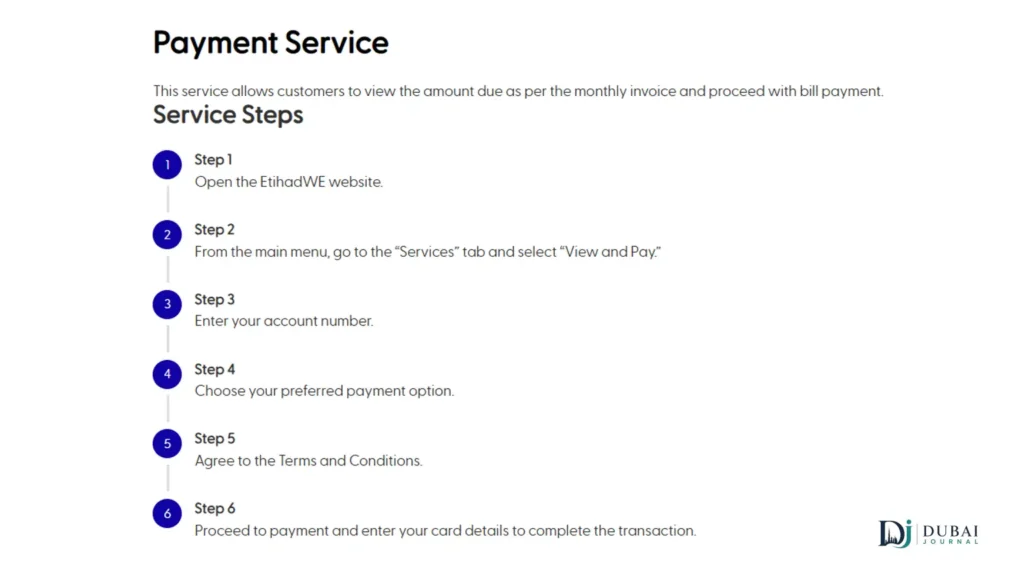
Stop after step 3 if you only want to see the balance.
Portal & app: full account access
Logging in with UAE PASS gives you every account you hold in one place, with saved cards and history.
Etihad WE portal
- Open the Etihad WE website and click Login, then select Customer.
- Sign in with UAE PASS.
- Click the account you want to pay on the dashboard.
- Press Pay Now.
- Pick a saved card or enter a new one.
The website also has a Multiple Accounts Payment page under Services for settling more than one account.
Etihad WE app
The app is available for iOS, Android and Huawei devices. Sign in with UAE PASS, or take the payment option that skips login, then pick the account, choose how to pay and confirm. UAEPay is a payment method in the app alongside cards.
Two extras matter for households. Friends Corner lets you pay another person’s bill, and the request tracker works without logging in.
Card limits & payment rules
Online card payments are capped at AED 10,000 per payment and 5 transactions per day, and the card must be a credit card issued in the GCC.
- A valid credit card and a valid email address are required.
- Cards issued outside the GCC are not accepted.
- The maximum card payment is AED 10,000.
- You can make at most 5 card transactions in one day.
If your balance is above AED 10,000, or your card was issued outside the GCC, pay through your bank or at a service centre instead.
Paying through your bank
Bank account holders can pay through their bank’s online banking at any hour, and 12 banks are on the Etihad WE list:
- Emirates NBD
- Abu Dhabi Commercial Bank (ADCB)
- Ajman Bank
- Commercial Bank of Dubai (CBD)
- Dubai Islamic Bank
- Emirates Islamic
- First Abu Dhabi Bank (FAB)
- National Bank of Fujairah
- RAKBANK
- Sharjah Islamic Bank
- United Arab Bank
- Abu Dhabi Islamic Bank (ADIB)
Log in, open the bill payment menu and search for Etihad WE, or FEWA if the first name returns nothing. Enter your account number, check the amount and confirm.
Kiosks, exchange houses & service centres
Self-service kiosks take payments around the clock, which makes them the fallback when the website is not an option. Al Ansari Exchange accepts bill payments from Saturday to Thursday, and Al Fardan Exchange is also listed as a payment option.
Service centres take payments in person, Monday to Thursday from 7:00 AM to 5:00 PM and Friday from 7:00 AM to 3:00 PM. For weekend payments, the website, app, online banking and kiosks run 24 hours, and Al Ansari Exchange is open on Saturdays.
Etihad WE runs 21 customer service centres across its area:
| Area | Centres | Count |
|---|---|---|
| Ras Al Khaimah | Al Nakheel, Al Madina, Al Jazeerah, Al Rams, Edhn, Al Kharan, Shaam | 7 |
| Dhaid region | Dhaid, Masfut, Munaei, Masafi, Manama, Al Madam, Falaj Al Moalla | 7 |
| Dibba | Dibba Al Fujairah, Dedna, Dibba Al Hesen | 3 |
| Fujairah | Fujairah, Qidfa | 2 |
| Ajman | Ajman | 1 |
| Umm Al Quwain | Umm Al Quwain | 1 |
Download your bill & payment history
The Etihad WE app downloads your Green Invoice and PDFs of these records:
- Account summary
- Account statement
- Consumption history
- Payment history
Keep the payment history PDF as your record of what you’ve paid. The consumption graphs in the same app show usage month by month, which is the quickest way to see why one bill came in higher than the last.
Payment didn’t go through
Most failed payments trace back to the card rules or a mistyped account number.
- Card declined: confirm it is a credit card issued in the GCC, that the amount is AED 10,000 or less, and that you haven’t already made 5 card payments that day.
- Account not found: re-enter the number exactly as printed on your bill.
- Portal asks you to sign in: the portal always uses UAE PASS. The View & Pay page does not.
- Paid, but the balance hasn’t moved: payments are expected to post within 1 working day. After that, send your receipt to cs@etihadwe.ae or message +971 800 3392 on WhatsApp.
Contact Etihad WE
Call 800 3392, message +971 800 3392 on WhatsApp or email cs@etihadwe.ae. Complaints and enquiries can also be filed through the website forms, and the contact form is answered within 3 working days.
FAQ
Is FEWA the same as Etihad WE?
Yes. Etihad WE was established in 2020 under Federal Decree-Law No. 31, builds on the Federal Electricity & Water Authority and is wholly owned by the Emirates Investment Authority.
Which areas does Etihad WE cover?
Ajman, Ras Al Khaimah, Fujairah, Umm Al Quwain, Al Dhaid and Dibba Al Fujairah.
Can I check my FEWA bill without an account?
Yes. The View & Pay page on the Etihad WE website asks only for your account number, and the app has a payment option that skips login too.
Can I pay someone else’s bill?
Yes, through Friends Corner in the Etihad WE app. On the website, View & Pay works for any account number you enter.
Can I pay more than one account at once?
The website has a Multiple Accounts Payment page under Services built for this.
What happens if I pay late?
Unpaid dues can lead to disconnection, and the reconnection fee is added to your bill when service is restored.
What to do next
- Find your account number on your latest bill.
- Run it through the View & Pay page to see the current amount.
- Install the Etihad WE app and sign in with UAE PASS if you want PDFs, graphs and saved cards.
- Save 800 3392 for payment problems and keep your receipt until the balance updates.
